

AI Agents for Document Automation: A Complete Guide to MCP, Workflows, and eSignatures
AI document automation connects AI agents to your document systems — reading unstructured content, triggering multi-step workflows, and executing legally binding eSignatures — without manual handoffs between tools. According to Gartner, 40% of enterprise applications will integrate task-specific AI agents by 2026, up from less than 5% in 2025. The Model Context Protocol (MCP) is the connectivity layer that makes this possible at scale.
What Is AI Document Automation?
AI document automation uses AI agents to handle the full document lifecycle — extracting data from source systems, populating templates, routing for approval, collecting signatures, and archiving — triggered by natural language instructions rather than hardcoded rules. Unlike rule-based RPA, AI agents interpret unstructured content such as meeting notes or CRM logs and determine the right action based on context. In most enterprise processes, eSignature remains the final bottleneck: AI agents close this gap by invoking eSignature services directly within the same workflow, removing the manual handoff entirely.
How AI Agents Work in Document Workflows
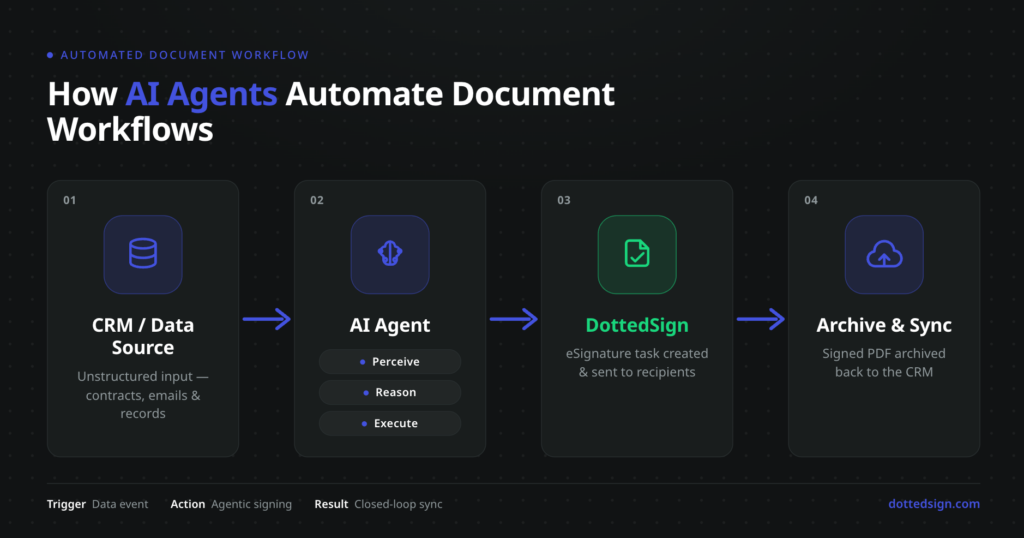
AI agents follow a three-layer cycle: perception (reading connected data), reasoning (determining the required action), and execution (triggering document creation, signing tasks, and CRM updates). The table below compares three tool categories across key enterprise criteria:
| Capability | Rule-Based Automation Platforms | API-Connected SaaS Workflow Tools | MCP-Enabled AI Agent Platforms |
| Input handling | Structured data only | Structured + semi-structured | Structured + unstructured (natural language) |
| Trigger mechanism | Hardcoded rules / schedules | Webhook + API event | Natural language prompt |
| eSignature integration | Requires custom API build per tool | Pre-built connectors, limited context | Native agent action via MCP |
| Cross-system orchestration | Predefined flow only | Workflow-scoped | Multi-system, context-aware |
Case in Practice — CRM × DottedSign
A business development team managing high volumes of advertising insertion orders connected their CRM, Claude AI, and DottedSign. A single instruction — “Find clients without insertion orders, organize their placement plans, and batch-create DottedSign task drafts” — triggers Claude to scan the CRM, extract key parameters from communication logs, batch-create pre-populated contract drafts in DottedSign, and write task links back to each CRM record automatically. The team reviews and dispatches without switching systems.
What Is the Model Context Protocol (MCP) and Why Does It Matter for Document AI?
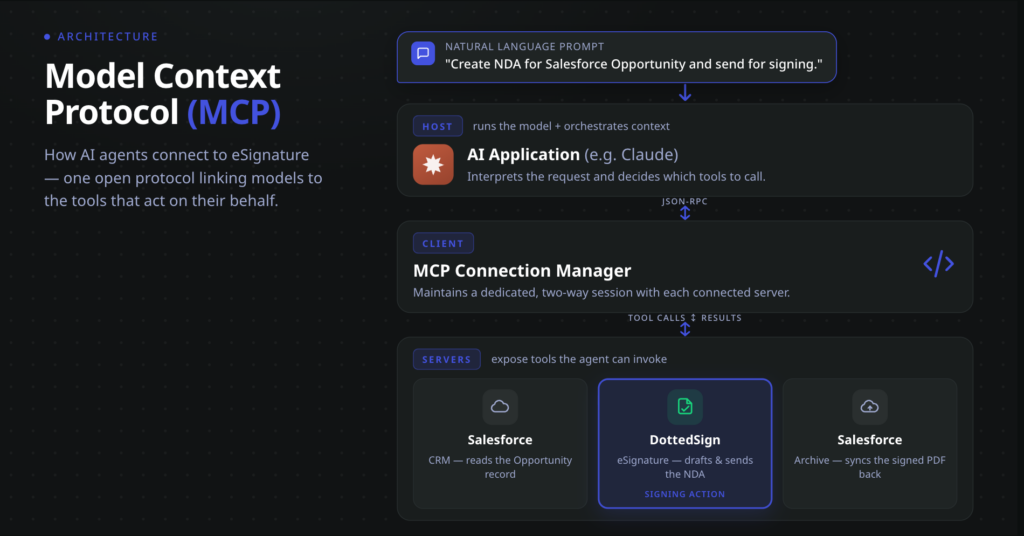
MCP is an open standard introduced by Anthropic in November 2024 that standardizes how AI agents connect to external tools. It defines three components: a Host (e.g., Claude), a Client (connection manager), and Servers (tools the agent can invoke). As of March 2026, over 200 MCP server implementations exist, including Salesforce, GitHub, Slack, Google Drive, and DottedSign. Unlike webhook-based integrations that require hardcoded triggers, MCP lets agents determine the right action at runtime based on context.
DottedSign MCP Server: eSignature as a Native Agent Action
DottedSign’s MCP Server exposes eSignature capabilities as native agent actions. When registered in an AI agent environment, the agent can create signing tasks from templates, assign recipients, enable notification emails, apply FieldSearchKey binding to auto-populate document fields with data pulled from connected systems, and receive completion events — all via natural language instruction rather than custom API code.
Salesforce × DottedSign MCP Workflow in Action: This end-to-end workflow using Claude with Salesforce’s hosted MCP server and DottedSign’s MCP server connected simultaneously:
- Register both MCP servers in the Claude agent environment — Salesforce’s hosted MCP serverproviding access to Opportunities, Contacts, and Notes, and DottedSign’s MCP server for signing task management.
- Issue a natural language prompt: “Find the most recent Qualification-stage Opportunity in Salesforce. Using the DottedSign NDA template, create a signing task, invite the Opportunity’s contacts, enable notification emails, and populate the Amount field from the Opportunity record.”
- Agent execution: Claude retrieved the Opportunity and associated Contact data from Salesforce, created a DottedSign signing task with contact email addresses set as recipients, bound the Opportunity’s Amount value to the corresponding DottedSign template field via FieldSearchKey, and dispatched the signing invitation with notifications enabled.
- Post-completion archiving: On signing completion, Salesforce downloaded the signed PDF from DottedSign’s storage and uploaded it to the Opportunity’s Notes & Attachments — creating a permanent, searchable record within Salesforce.
The result: a workflow that previously required a sales representative to export contact data, prepare an NDA manually, send by email, track responses, and file the completed document now runs as a single agent task — from natural language prompt to archived signed record.
eSignature Automation: How AI Agents Replace Manual Signing Bottlenecks
AI agents handle document creation, field population, signing task dispatch, and follow-up in a closed loop. If a signer hasn’t acted within the defined SLA window, the agent resends the invitation or re-assigns the contact. On completion, the signed document and audit trail are routed to the designated archive automatically.
The compliance layer functions consistently whether a task was initiated by a human or an agent. DottedSign issues AATL-authorized digital certificates, and every signing event produces a tamper-proof audit trail recording signer identity, timestamp, IP address, and device information.
Expanding Agent Automation: CLM, BPM, HRM, and Beyond
CLM: Contract Lifecycle Management
An AI agent connected to SharePoint, Google Drive, or a CLM platform tracks review status, monitors approval stages, issues deadline reminders, and triggers DottedSign for final execution. Renewal and expiry dates are tracked automatically, with advance notice sent when a contract approaches its term end.
BPM: Enterprise Process Approval Automation
When a procurement request or compliance authorization reaches a defined approval stage in Jira, Asana, or enterprise BPM tools, the agent dispatches a DottedSign signing task. On completion, the signed document attaches to the process record and the workflow advances automatically.
HRM: Employee Document Lifecycle
An agent connected to an HRM system detects lifecycle trigger events — hiring, onboarding, role changes, offboarding — and automatically sends the appropriate DottedSign signing task with pre-populated fields. Completion status is written back to the employee record, giving HR managers a consolidated view across all active cases.
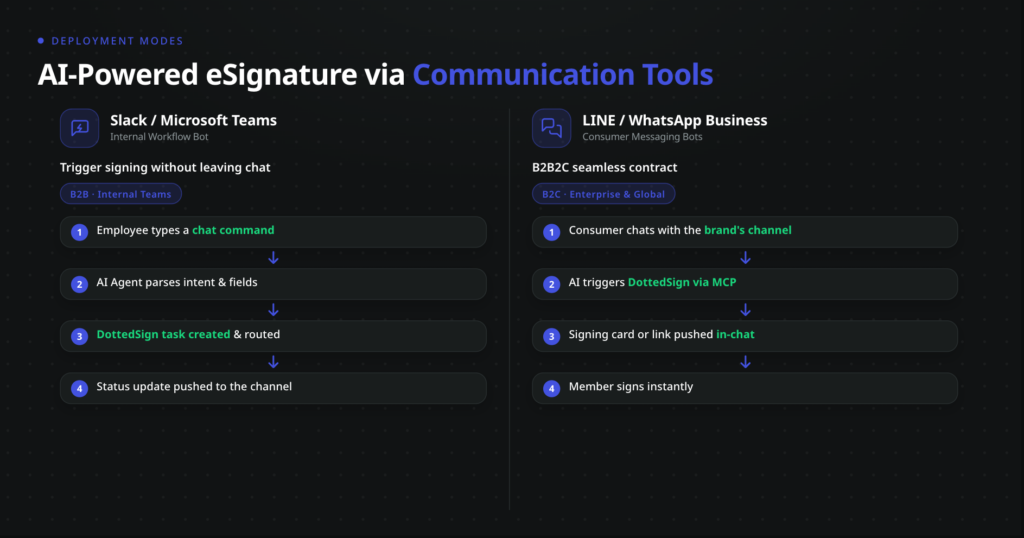
Communication Tools: Instant Workflow Orchestration
Integrating AI agents with Slack or Microsoft Teams turns chat into a live command center for document execution. A single message — “Send the standard vendor NDA to Alex at partnercompany.com” — triggers the agent to pull the template, create the DottedSign task, and share a review link in the same window. Status updates are pushed to designated channels the moment a contract is signed or an approval is pending.
Frequently Asked Questions
Document automation handles the creation, routing, signing, and archiving of business documents without manual intervention at each handoff. It reduces time spent on repetitive tasks, lowers data error rates, and addresses compliance gaps that grow as document volumes scale across sales, legal, HR, and operations.
AI agents perceive inputs from connected systems, reason about the required action, and execute it across tools — without human specification at each step. In document automation, a single natural language instruction can trigger CRM data extraction, contract draft creation, DottedSign task dispatch, and CRM status update in sequence.
MCP provides a standardized connection layer so AI agents can invoke eSignature services as native actions. With DottedSign’s MCP Server registered, the agent creates tasks, assigns recipients, binds data fields, and receives completion events — without custom API code or separate integration maintenance.
eSignatures are the final execution step that transforms documents into legally binding agreements. Tasks created through the DottedSign MCP Server follow the same trusted signing process as those created directly in DottedSign, including AATL-certified digital certificates, tamper-evident audit trails, and document integrity protections.
Configure templates with FieldSearchKey binding to prevent agent-supplied data from overwriting read-only fields; explicitly enable notification emails at task creation; validate audit trail output in a pilot before scaling; and define a fallback action for SLA breaches, such as re-assigning the recipient contact.
Key issues include authentication token expiry requiring re-authorization logic, file size constraints when archiving signed PDFs via API, and the need to configure download permissions for cloud-stored documents. A scoped pilot — one document type, two connected systems — reduces risk before full rollout.