

5 Construction Workflows That Still Slow Down Texas Projects (and How to Fix Them)
Quick Answer
Many construction delays don’t begin on the job site—they begin in the office. Manual approval processes, disconnected document management, and paper-based workflows create bottlenecks that slow decisions, delay crews, and increase administrative work. Modern digital workflows help construction teams route, approve, track, and manage project documents more efficiently, keeping projects moving from planning through closeout.
Key Takeaways
- Manual document workflows often create unnecessary project delays.
- Approval bottlenecks reduce visibility across project teams.
- Mobile document workflows keep office and field teams connected.
- Centralized document management simplifies compliance and project coordination.
- Digital approvals help contractors scale operations without increasing paperwork.
Projects Move Fast. Paperwork Often Doesn’t.
Construction projects depend on hundreds of decisions made every week.
A work authorization needs approval before crews mobilize. An inspection report must be reviewed before the next phase begins. A subcontractor agreement has to be signed before work starts.
When those approvals are delayed, projects lose momentum long before anyone picks up a tool.
For many Texas contractors, these delays aren’t caused by poor planning—they’re caused by manual document workflows that haven’t kept pace with growing operations.
As commercial construction, industrial development, manufacturing, and energy projects continue to expand across Texas, contractors are finding that modernizing document workflows can remove friction from nearly every stage of a project.
Here are five workflows that continue to slow construction projects—and how digital approvals can help.
1. Change Order Approvals
Every project experiences changes.
Whether it’s an owner request, an unforeseen site condition, or a material substitution, change orders are part of everyday construction.
The problem isn’t creating the document.
It’s getting everyone to approve it.
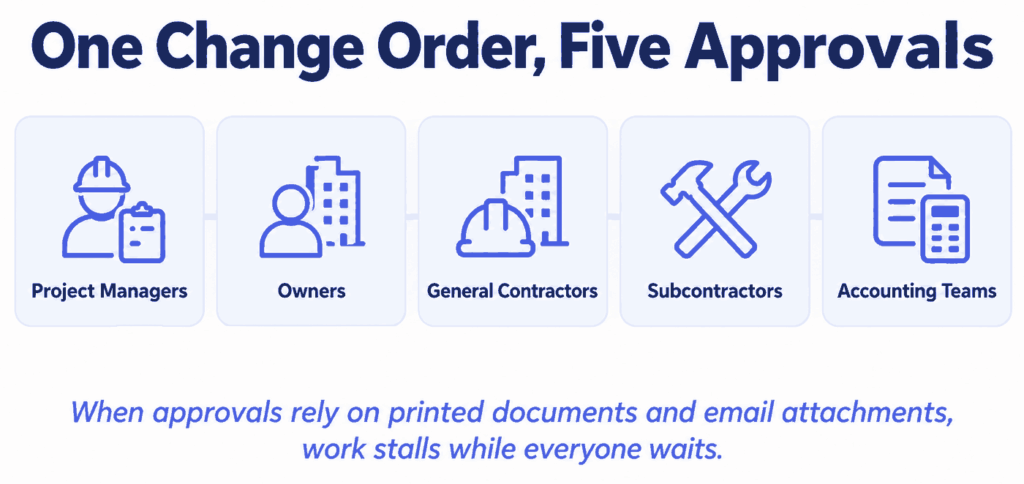
A typical change order may require signatures from:
- Project managers
- Owners
- General contractors
- Subcontractors
- Accounting teams
When approvals rely on printed documents, email attachments, or handwritten signatures, work can stall while everyone waits.
A Better Approach: Route and Track Change Orders Digitally
Digital approval workflows allow change orders to be routed automatically, signed electronically, and tracked in real time.
Instead of wondering who has the document, project managers can immediately see what’s approved, pending, or overdue.
2. Subcontractor and Vendor Onboarding
Every new subcontractor brings paperwork.
Construction companies routinely collect:
- Master service agreements
- Insurance certificates
- Tax documentation
- Safety acknowledgments
- Vendor agreements
- Compliance forms
When these documents are managed manually, onboarding can take days instead of hours.
Missing paperwork also creates compliance risks and delays project mobilization.
A Better Approach: Standardize Every Onboarding Packet
Standardized digital workflows ensure every subcontractor receives the same documentation, approvals are completed faster, and completed records remain organized in one secure location.
The result is a smoother onboarding process that helps crews get to work sooner.

3. Job Site Document Approvals
Construction doesn’t happen behind a desk.
Project managers, superintendents, inspectors, and field supervisors spend most of their day moving between active job sites.
Yet many approvals still require someone to:
- Print a document
- Scan paperwork
- Return to the office
- Email signed PDFs
- Follow up by phone
Every extra step introduces another opportunity for delays.
A Better Approach: Approve Documents From the Job Site
Mobile document workflows allow teams to review and sign documents from virtually anywhere.
Whether approving inspection reports, work authorizations, or daily reports, field teams can complete approvals without interrupting the workday.
4. Compliance Documentation
Construction projects generate an enormous amount of documentation throughout their lifecycle.
Examples include:
- Safety forms
- Inspection reports
- RFIs
- Permit documentation
- Incident reports
- Project closeout documents
When these records are scattered across inboxes, paper folders, and shared drives, finding the right document becomes time-consuming—especially during audits or project closeouts.
A Better Approach: Centralize Compliance Records
Centralized digital document management provides one searchable location for completed approvals while maintaining secure audit trails and version history.
Teams spend less time searching for documents and more time managing projects.
5. Internal Approval Workflows
Not every approval involves clients or subcontractors.
Construction companies also process internal documents every day, including:
- Purchase requests
- Equipment approvals
- Budget approvals
- Contract reviews
- HR documentation
- Capital expenditure requests
These workflows often depend on email chains or informal conversations, making it difficult to track who has approved what.
As companies grow, these small inefficiencies become much larger operational challenges.
A Better Approach: Add Visibility to Internal Approvals
Digital approval workflows provide greater visibility into internal processes, helping leadership make faster decisions while maintaining accountability across departments.
Why These Workflows Matter for Texas Contractors
Texas continues to lead the nation in commercial development, infrastructure investment, manufacturing expansion, and energy projects.
With growth comes complexity.
Contractors aren’t just managing more projects—they’re coordinating more vendors, more subcontractors, more inspections, and more approvals across multiple job sites.
Without consistent document workflows, administrative work grows alongside the business.
Modern workflow automation allows contractors to improve efficiency without significantly increasing administrative overhead, making it easier to scale operations while maintaining quality and compliance.
How DottedSign Supports Construction Workflow Automation
Construction projects generate hundreds of documents that require timely approvals.
From change orders and subcontractor agreements to inspection reports and project closeouts, every document represents a decision that keeps work moving.
DottedSign gives construction teams one centralized platform to:
- Route documents for approval
- Collect secure electronic signatures
- Track approval progress in real time
- Create reusable document templates
- Organize completed records
- Support mobile approvals from any location
Instead of relying on disconnected emails and paper files, teams gain greater visibility into every stage of the approval process.
For contractors with existing project management systems or internal applications, DottedSign’s API can also embed electronic signature capabilities directly into existing workflows.
Best Practices for Faster Construction Workflows
As projects become more complex, consistent processes become increasingly important.
Consider these best practices:
✅ Standardize document templates
✅ Enable mobile approvals for field teams
✅ Centralize project documentation
✅ Automate recurring approval workflows
✅ Track document status in real time
✅ Maintain secure audit trails
Small workflow improvements made across dozens of projects can significantly reduce administrative effort while helping projects stay on schedule.
Frequently Asked Questions
Construction workflow automation uses digital tools to streamline document approvals, routing, tracking, and record management, reducing manual work and improving project efficiency.
Common examples include change orders, subcontractor agreements, RFIs, inspection reports, work authorizations, purchase approvals, safety documentation, and project closeout forms.
Yes. Modern document workflow platforms allow project teams to review and electronically sign documents using smartphones, tablets, or computers from virtually any location.
Better Workflows Keep Projects Moving
Construction success depends on more than skilled crews and strong project planning.
It also depends on how efficiently information moves between the office, the field, subcontractors, and clients.
By replacing manual approvals with digital workflows, Texas contractors can reduce administrative bottlenecks, improve visibility across projects, and keep decisions moving at the pace construction demands.
The less time your team spends searching for paperwork, the more time they can spend building.
Ready to Streamline Your Construction Workflows?
DottedSign helps Texas construction teams route, approve, track, and manage critical project documents from one centralized platform. Whether you’re coordinating change orders, onboarding subcontractors, or managing project closeouts, digital workflows help reduce delays and keep every project moving forward.