

How Texas Contractors Can Eliminate Paper-Based Change Orders with Digital Approvals
Quick Answer
Paper-based change orders slow construction projects by delaying approvals, limiting visibility, and creating unnecessary administrative work. Digital approval workflows allow project teams to route, sign, track, and store change orders electronically, helping contractors keep projects moving while maintaining accurate documentation.
Key Takeaways
- Paper change orders create approval bottlenecks that delay projects.
- Mobile approvals help office and field teams stay aligned.
- Digital workflows improve visibility into document status.
- Electronic audit trails simplify compliance and project closeouts.
- DottedSign helps construction teams manage approvals from anywhere.
Every Approval Impacts the Project Schedule
Construction projects rarely follow the original plan. Scope changes, material substitutions, unforeseen site conditions, and owner requests all require change orders before work can continue.
The challenge isn’t creating the change order—it’s getting it approved.
For many Texas contractors, approvals still move through email chains, printed documents, phone calls, and handwritten signatures. Project managers spend valuable time tracking paperwork instead of managing the job, while field teams wait for approvals before moving forward.
Construction doesn’t slow down. Your approval process shouldn’t either.
As commercial development continues across Austin, Dallas, Houston, and San Antonio, contractors are looking for faster ways to keep projects moving. Digital document workflows have become one of the simplest ways to reduce delays without disrupting existing operations.
What Is a Construction Change Order?
A construction change order is a formal document that modifies the original construction contract after work has begun. It typically records changes to project scope, pricing, materials, timelines, or labor requirements.
A change order often requires approval from multiple stakeholders, including:
- Project managers
- General contractors
- Property owners
- Subcontractors
- Accounting teams
Until those approvals are complete, work may be delayed, materials can’t be ordered, and schedules become harder to manage.
Why Paper-Based Change Orders Slow Projects
Paper workflows may feel familiar, but they create hidden delays throughout a project.
Common challenges include:
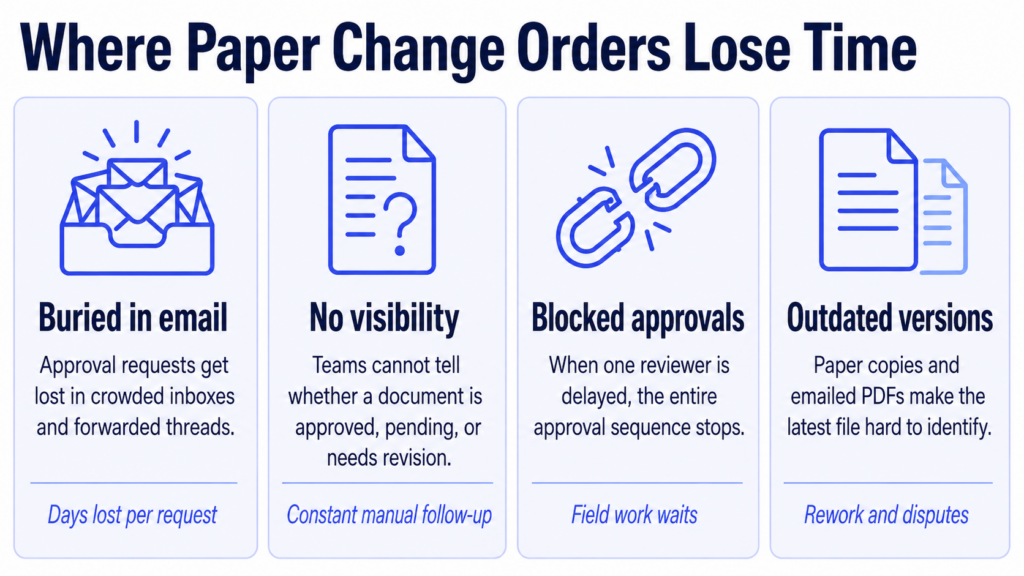
Documents Get Stuck in Email
Approval requests are buried in inboxes, forwarded between teams, or overlooked while stakeholders are traveling between offices and job sites.
Limited Visibility
Project teams often don’t know whether a document has been approved, is waiting for review, or needs revisions.
Sequential Approvals
Many construction documents require multiple approvals before work can continue. When one reviewer is delayed, the entire workflow stops.
Lost or Outdated Documents
Paper copies and emailed PDFs increase the risk of using outdated versions or spending time searching for the latest file.
These small delays quickly add up, affecting schedules, subcontractor coordination, procurement, and client communication.
Why This Matters for Texas Contractors
Texas continues to experience strong growth in commercial construction, industrial facilities, manufacturing, and energy infrastructure. Many contractors now manage multiple projects across different cities and job sites simultaneously.
That growth creates more documentation—not less.
In addition to change orders, construction teams manage:
- Requests for Information (RFIs)
- Work authorizations
- Safety acknowledgements
- Inspection reports
- Purchase approvals
- Vendor agreements
- Project closeout documentation
When every document follows a manual approval process, administrative work grows just as quickly as the business.
For mid-market contractors, modernizing document workflows isn’t just about convenience—it’s about scaling operations without adding unnecessary administrative overhead.
What a Digital Change Order Workflow Looks Like
Digital workflows replace paper routing with a centralized approval process.
A typical workflow looks like this:
| Traditional Process | Digital Workflow |
| Print documents | Create and send digitally |
| Email attachments | Route automatically for approval |
| Manual follow-up | Real-time status tracking |
| Scan signed copies | Secure eSignatures |
| File paper records | Centralized digital storage |
Instead of wondering where a document is, project managers can immediately see whether it’s pending, approved, or completed.

Mobile Approvals Keep Job Sites Moving
Construction happens in the field—not behind a desk.
Project managers, superintendents, subcontractors, and inspectors spend much of their day moving between job sites.
Mobile approvals allow teams to:
- Review documents from any device
- Sign electronically from the field
- Receive instant notifications
- Access completed documents immediately
- Keep projects moving without returning to the office
When approvals travel with your team, projects spend less time waiting on paperwork.
How DottedSign Supports Construction Workflows
Construction projects generate hundreds of approvals—from RFIs and inspection reports to work authorizations, safety documentation, subcontractor agreements, and project closeouts.
When those documents move through inboxes, paper folders, and phone calls, projects lose momentum.
DottedSign gives construction teams one place to route, approve, track, and manage critical project documents.
With DottedSign, teams can:
- Send change orders for eSignature in minutes
- Track approval status in real time
- Create reusable templates for recurring workflows
- Collect signatures from owners, vendors, and subcontractors remotely
- Store completed documents securely for future reference
For organizations looking to automate workflows even further, DottedSign’s API can integrate eSignatures directly into existing project management systems and internal applications.
Best Practices for Managing Change Orders
Contractors looking to improve approval workflows should consider these best practices:
✅ Standardize change order templates
✅ Route approvals through a consistent process
✅ Enable mobile signing for field teams
✅ Store documents in one searchable location
✅ Track approval status in real time
✅ Maintain secure audit trails for every completed document
Small improvements to document workflows can save significant administrative time across dozens of projects each year.
Frequently Asked Questions
Yes. eSignatures are generally recognized as legally enforceable in the United States when they meet applicable legal requirements and all parties consent to sign electronically.
Yes. Modern eSignature platforms allow recipients to review and sign documents from smartphones, tablets, or computers without specialized software.
eSignatures are commonly used for RFIs, subcontractor agreements, work orders, safety forms, inspection reports, vendor onboarding, purchase approvals, and project closeout documentation.
Keep Projects Moving, Not Paperwork
Every change order represents an important decision. The faster that decision moves through the approval process, the faster work can continue.
For growing Texas contractors, replacing paper-based approvals with digital workflows reduces delays, improves visibility, and helps project teams spend less time chasing documents and more time delivering successful projects.
Whether you’re managing a single commercial build or coordinating projects across multiple job sites, modern document workflows help keep everyone aligned—from the office to the field.
Ready to Modernize Your Construction Approval Workflows?
DottedSign helps Texas construction teams route, approve, track, and manage project documents from one centralized platform. By replacing paper-based approvals with secure digital workflows, contractors can improve collaboration, reduce administrative bottlenecks, and keep projects moving without wondering where critical documents are.