
How Mobile Document Workflows Improve Productivity on Texas Job Sites
Quick Answer
Construction teams work where the project happens—not behind a desk. Mobile document workflows allow project managers, superintendents, subcontractors, and inspectors to review, approve, and sign critical documents from virtually anywhere. By replacing paper-based approvals with mobile-friendly workflows, Texas contractors can reduce delays, improve communication, and keep projects moving without waiting on paperwork.
Key Takeaways
- Construction teams need access to project documents wherever work takes place.
- Paper-based approvals slow communication between the office and the field.
- Mobile document workflows improve visibility across every project.
- Faster approvals help reduce delays and improve job site productivity.
- Digital workflows make it easier to manage construction documentation from one centralized platform.
Construction Doesn’t Happen Behind a Desk
Construction projects are constantly moving.
Project managers travel between meetings and job sites. Superintendents oversee field operations across multiple locations. Inspectors review completed work while subcontractors coordinate schedules, deliveries, and crews throughout the day.
Yet many critical documents still depend on paper forms, email attachments, or someone returning to the office before work can continue.
The result is familiar to many contractors.
Documents sit in inboxes waiting for review.
Approvals become delayed.
Crews wait for decisions.
Projects lose momentum.
As construction companies across Texas continue to grow, mobile document workflows are helping bridge the gap between the office and the field—keeping projects moving no matter where work happens.
What Is a Mobile Document Workflow?
A mobile document workflow allows construction teams to review, approve, sign, and track project documents from smartphones, tablets, or laptops instead of relying on printed paperwork.
Rather than carrying paper forms between job sites and the office, project teams can complete approvals digitally and keep documents moving in real time.
Common mobile workflows include:
- Change orders
- Work authorizations
- RFIs
- Inspection reports
- Safety acknowledgments
- Subcontractor agreements
- Daily field reports
- Vendor documentation
- Project closeout forms
When documents move with the project, decisions happen faster.
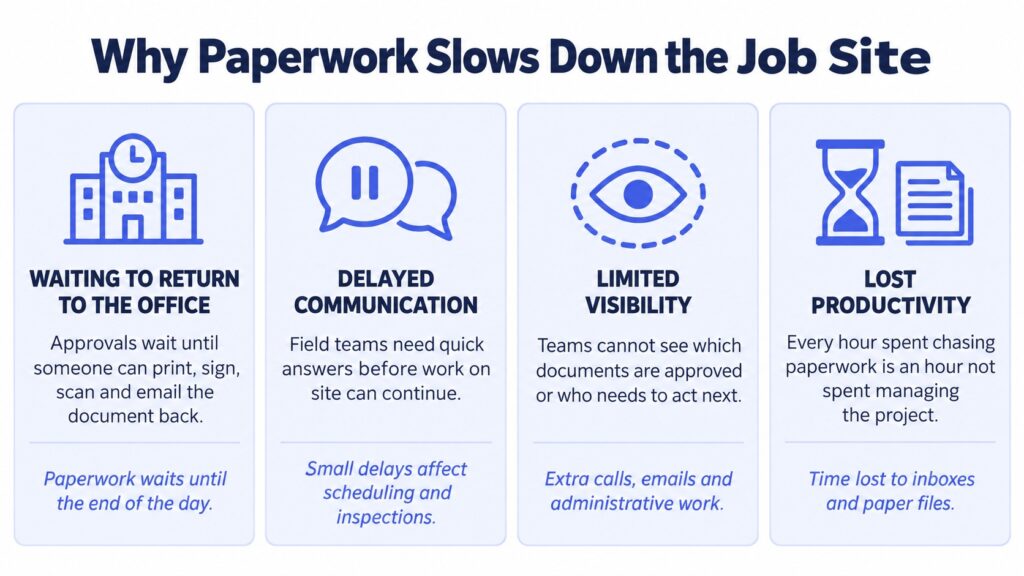
Why Paperwork Slows Down the Job Site
Construction is built around momentum.
When information doesn’t move quickly, neither does the project.
Here are some of the most common challenges contractors experience.
Waiting to Return to the Office
Many approvals still require someone to print a document, sign it, scan it, and email it back.
For project managers working across multiple sites, that often means paperwork waits until the end of the day—or even longer.
Delayed Communication
Field teams frequently need quick answers before work can continue.
If approvals depend on office hours or manual follow-up, small delays can quickly affect scheduling, inspections, or subcontractor coordination.
Limited Visibility
Without a centralized workflow, project teams often don’t know:
- Which documents are approved
- Which are waiting for review
- Which version is current
- Who needs to act next
That uncertainty creates unnecessary phone calls, emails, and administrative work.
Lost Productivity
Every hour spent chasing paperwork is an hour not spent managing the project.
Construction professionals are hired to solve problems on-site—not search inboxes or organize paper files.
Why This Matters for Texas Contractors
Texas construction projects often span multiple locations, large job sites, and distributed project teams.
Commercial developments in Austin, industrial facilities in Houston, manufacturing expansions in Dallas, and infrastructure projects throughout the state require constant coordination between office staff and field personnel.
That means project documentation needs to be just as mobile as the workforce.
As contractors take on more projects and manage larger subcontractor networks, the ability to review and approve documents from anywhere becomes an operational advantage—not simply a convenience.
What a Mobile Workflow Looks Like
Modern document workflows allow approvals to happen wherever work is taking place.
Instead of relying on manual paperwork, documents move digitally through one centralized process.
| Traditional Workflow | Mobile Workflow |
| Print paperwork | Send digitally |
| Return to office to sign | Sign from any device |
| Email scanned copies | Secure electronic signatures |
| Manual status updates | Real-time tracking |
| Paper filing | Centralized document storage |
Instead of asking, “Can you sign this when you’re back in the office?”, teams can keep approvals moving wherever they are.
Better Mobility Creates Better Collaboration
Mobile workflows don’t just improve productivity—they improve communication across the entire project.
Project managers gain greater visibility into document status.
Superintendents can approve documents without leaving the job site.
Subcontractors receive documents faster.
Owners can review approvals remotely.
Accounting teams receive completed documents immediately.
Everyone works from the same information, reducing confusion while helping projects move forward with fewer delays.
How DottedSign Supports Mobile Construction Workflows
Construction projects generate hundreds of documents that need timely approvals.
From change orders and work authorizations to inspection reports and project closeouts, every document represents another decision that keeps work moving.
DottedSign helps construction teams:
- Send documents for approval from anywhere
- Collect secure electronic signatures on mobile devices
- Track document progress in real time
- Create reusable templates for recurring workflows
- Organize completed documents in one centralized location
- Maintain secure audit trails for every approval
Whether teams are working from the office, the trailer, or the job site, DottedSign helps everyone stay connected through one streamlined document workflow.
For organizations using project management software or internal construction platforms, DottedSign’s API can also embed electronic signatures directly into existing workflows, reducing unnecessary steps while keeping teams inside the systems they already use.
Best Practices for Mobile Construction Workflows
As construction projects become more distributed, document processes should become simpler—not more complicated.
Consider these best practices:
✅ Enable mobile approvals for every project
✅ Standardize document templates
✅ Centralize project documentation
✅ Give field teams real-time visibility into approval status
✅ Reduce unnecessary manual follow-ups
✅ Maintain secure digital audit trails
The easier it is to complete approvals from the field, the easier it is to keep projects moving.
Frequently Asked Questions
A mobile document workflow allows construction teams to review, approve, sign, and manage project documents using smartphones, tablets, or laptops from virtually any location.
Common examples include change orders, RFIs, inspection reports, subcontractor agreements, work authorizations, safety acknowledgments, daily reports, vendor documents, and project closeout paperwork.
Yes. Mobile workflows reduce delays caused by paper documents, improve communication between office and field teams, and help construction companies complete approvals faster while maintaining better visibility into document status.
Productivity Starts with Better Workflows
Construction projects move quickly because people move quickly.
Your document workflows should do the same.
When project teams can review, approve, and track documents from anywhere, work doesn’t pause because someone is away from their desk.
By replacing paper-based approvals with mobile document workflows, Texas contractors can improve collaboration, reduce administrative bottlenecks, and keep projects moving from the office to the job site.
Because every document waiting for approval is another decision waiting to be made.
Ready to Bring Your Document Workflows to the Job Site?
DottedSign helps Texas construction teams route, approve, track, and manage project documents from one centralized platform. Whether you’re approving change orders, inspection reports, subcontractor agreements, or work authorizations, mobile-friendly workflows help reduce delays, improve visibility, and keep every project moving—wherever work happens.