How to Identify Workflow Bottlenecks in Your Business
Every organization has workflows.
Some are carefully designed. Others simply evolve over time.
A document gets emailed because that’s how the team has always done it. A manager manually tracks approvals because no system exists. Employees create spreadsheets to monitor processes because the original workflow no longer works at the current business size.
These workarounds may seem harmless when operations are small.
But as companies grow, they begin creating friction.
Approvals slow down. Communication becomes harder. Employees spend more time managing processes instead of completing valuable work.
The challenge is that workflow bottlenecks are often difficult to see from inside the organization.
Teams adapt. Employees find ways to work around problems. Delays become accepted as “part of the process.”
Identifying these bottlenecks is the first step toward building faster, more scalable operations.
What Is a Workflow Bottleneck?
A workflow bottleneck occurs when one step in a process slows down the entire operation.
Think of a construction project waiting on a change order approval.
The crew is ready.
The materials are available.
The schedule is planned.
But one document is sitting in an inbox waiting for approval.
That single delay affects everything downstream.
The same pattern appears across industries.
A field technician cannot close a service ticket until customer documentation is signed.
A vendor cannot begin work until onboarding paperwork is approved.
A maintenance team cannot proceed until safety documentation is reviewed.
The workflow itself may not be broken—but one inefficient step creates delays throughout the entire process.
Why Workflow Bottlenecks Become More Common During Growth
Many businesses don’t experience workflow issues when they are small.
A team of five people can often manage approvals through conversations, emails, and shared folders.
But as companies expand, informal processes become harder to maintain.
More employees create more communication paths.
More customers create more documentation.
More projects create more approvals.
This is especially true for industries with distributed teams.
Texas contractors, energy providers, utilities, and field service organizations often coordinate work across multiple locations, subcontractors, technicians, and office teams.
As operational complexity increases, workflows need structure—not more manual coordination.
Signs Your Business Has Workflow Bottlenecks
Bottlenecks are not always obvious.
They often appear through small daily frustrations that accumulate over time.
Common warning signs include:
Employees Regularly Follow Up on Documents
If team members frequently ask:
“Has this been approved?”
“Who has the document?”
“Are we waiting on someone?”
there is likely a visibility issue within the workflow.
Approvals Depend on Individual People
When progress depends on one person remembering to forward, review, or approve a document, the workflow becomes fragile.
If that person is unavailable, the process slows down.
Documents Live Across Multiple Systems
Important information scattered across email inboxes, shared folders, spreadsheets, and personal devices makes it difficult to understand the current status of work.
Field Teams Wait for Office Decisions
When technicians, supervisors, or subcontractors cannot move forward without returning to office-based processes, productivity suffers.
Employees Create Their Own Tracking Systems
Spreadsheets, reminder lists, and personal notes are often signs that existing workflows do not provide enough visibility.

How to Find the Source of Workflow Problems
Identifying bottlenecks requires looking beyond individual tasks.
Start by mapping the complete process.
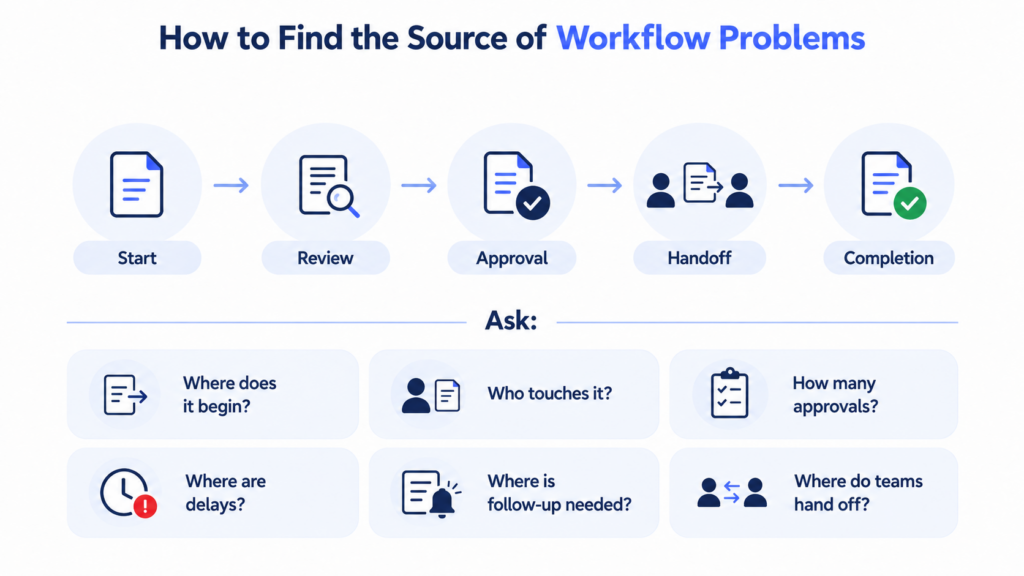
Ask questions like:
- Where does the workflow begin?
- Who touches the document?
- How many approval steps exist?
- Where do delays usually occur?
- Which steps require manual follow-up?
- Where does information get transferred between teams?
Many organizations discover that the biggest delays occur during handoffs.
A field employee completes a document.
An office manager reviews it.
A customer approves it.
Accounting processes it.
Each transition creates an opportunity for delay.
The more manual handoffs a workflow has, the more likely it is to experience friction.
Common Workflow Bottlenecks in Operational Industries
While every business is different, certain processes consistently create challenges.
For construction teams:
- Change order approvals
- Subcontractor onboarding
- Safety documentation
- Inspection records
- Project completion signoffs
For energy and field service organizations:
- Work authorizations
- Maintenance approvals
- Customer service reports
- Compliance documentation
- Vendor management workflows
For utilities and operations teams:
- Field reports
- Equipment documentation
- Inspection approvals
- Service completion records
These workflows share a common challenge: multiple stakeholders need access, approval, or visibility before work can continue.
How Workflow Automation Removes Bottlenecks

Once bottlenecks are identified, the next step is improving the process.
Workflow automation helps organizations replace manual coordination with structured digital workflows.
Instead of relying on employees to remember each step, automated workflows guide documents through predefined approval paths.
This creates:
- Faster approval cycles
- Better document visibility
- Reduced administrative follow-up
- More consistent processes
- Improved collaboration
- Stronger compliance records
The goal is not simply to eliminate paperwork.
The goal is to create a process where work moves forward more efficiently.
How DottedSign Helps Organizations Improve Workflows
DottedSign helps companies identify and improve document-based workflow bottlenecks by transforming existing PDF and eSignature processes into connected digital workflows.
Organizations can digitize the documents they already use and create structured approval processes around them.
Whether it’s a construction change order, energy maintenance report, customer signoff, vendor agreement, or compliance document, DottedSign helps teams move information between stakeholders faster.
Key capabilities include:
- Mobile document approvals
- Automated workflow routing
- Multi-step approval processes
- Real-time document tracking
- Secure audit trails
- Centralized document management
- PDF workflow automation
By improving visibility and reducing manual coordination, DottedSign helps operational teams spend less time managing documents and more time completing work.

Better Workflows Start With Better Visibility
Many workflow problems continue because organizations don’t have a clear view of how work moves through the business.
Before investing in new technology, companies should understand where delays occur, which processes create friction, and where teams spend unnecessary time coordinating tasks.
Once those bottlenecks are visible, improving them becomes much easier.
The best workflow improvements often begin with a simple question:
“Where is work waiting?”
Further reading: See how YONEX cut administrative time by 90% after digitizing its approval workflows with DottedSign.
Conclusion
Workflow bottlenecks rarely appear overnight.
They develop slowly as businesses grow, teams expand, and processes become more complicated.
For operational organizations, identifying these bottlenecks is the first step toward improving efficiency, reducing delays, and creating scalable processes.
By understanding where documents slow down, where approvals get stuck, and where teams lose visibility, businesses can begin building workflows that support growth.
DottedSign helps organizations take that next step by transforming everyday documents into automated workflows that connect teams, simplify approvals, and keep operations moving.